
K8s Architecture
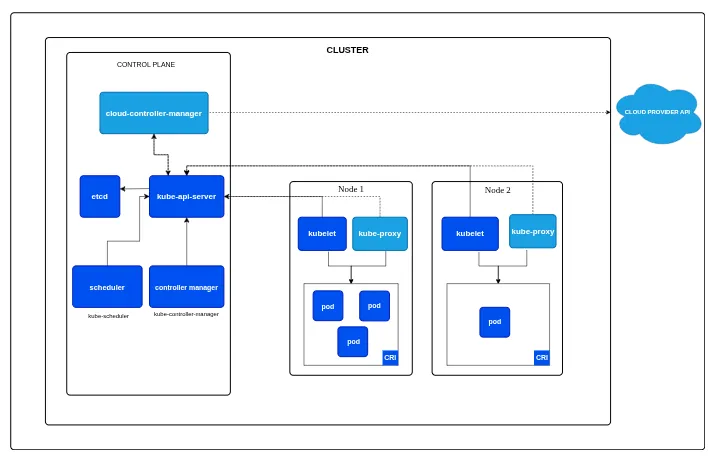
- K8s Architecture consist of two parts, the CONTROL PLANE (master) and the WORKER NODE (slave)
- control plane makes global decisions about the cluster and used to manage the whole kubernetes environment
- worker nodes are worker nodes that work to run the work, basically their goal is to run the required workload
- if control plane is brain then worker node is basically muscle
- both consist of different set of components.
CONTROL PLANE
- control plane makes global decisions about cluster like scheduling, detecting changes in cluster, keeping everything in desired state etc
- it consists of 5 components
- KUBE-API SERVER
- kube-api server exposes the kubernetes api which is front end for the control plane, the only open door for communication
- every component and we all talk directly to api server, be it any kubectl command or any component reporting their status
- it does not store any data, its stateless. every data is stored in etcd
- it can be scaled horizontally (running multiple instances) for HA
- there are 3A of api server, Authentication, Authorization, Admission control
- Authentication simply verifies whether the client is authorized to access through certificates or tokens
- Authorization checks if the authenticated identity has permission for the requested action through RBAC ,etc
- Admission control decides whether this request is to be modified or rejected
- mutating admission control can modify any request like injecting sidecars or adding default resource quotas etc
- validating admission control can allow or reject the request based on the specification like some image is not allowed
- so even if you are allowed to run a pod, if you are running a banned image defined in validating admission control, your request fails
- ETCD
- its the single source of truth of kubernetes. highly available, consistent key value store
- it stores all the cluster data like nodes, running pods, secrets, etc everything is stored here
- all kubernetes objects like pods, deployments, services, configmaps, secrets, current and desired state of all resources, Persistent volume claims, network policies, rbac rules etc are stored in etcd
- other data like pod logs or metric data etc are not stored in etcd
- etcd uses the Raft consensus algorithm
- KUBE-SCHEDULER
- its sole purpose is to just find the best worker node for a pod to run on
- it does not start the pod, it just decides the best node for a pod using algorithms and conditions
- the decision involves 2 step where it filter out the feasible nodes which meets the requirement to run a pod
- after that it scores all the feasible nodes to find the most optimal node for the pod
- Filtering is done based on conditions defined in manifest like NodeSelector, NodeAffinity, Taints/Tolerations, Resources, Volume, Port, PodAffinity/Anti-Affinity, once done it outputs a list of feasible nodes
- Scoring is done via weighted scoring system where multiple plugins result in a final score of feasible nodes like LeastAllocated, ImageLocality etc factors.
- when there is a tie between multiple nodes score, it simply chooses the lowest alphabetical node name
- KUBE-CONTROLLER-MANAGER
-
it is like a manager who watches specific resource types and ensure that current state matches the desired state
-
it runs as a single binary but contains multiple independent controllers
-
this simply gives the k8s its self-healing properties
-
you can create a standalone pod without this but you can’t do main things without it
-
Deployment Controller manage deployments and their rollout strategies
-
ReplicaSet Controller ensure the correct number of pod replicas are running
-
StatefulSet Controller manage stateful applications with stable networking and storage
-
DaemonSet Controller ensures every node run the specified pod
-
Node Controller monitor node health and manage node lifecycle like node monitoring and eviction
-
Endpoints Controller manages endpoints objects which links services to pods
-
Service Account & Token Controllers manages service accounts and their authentication token
-
Persistent Volume Controller bind persistent volume claims to persistent volumes
-
Namespace Controller manages namespace creation and deletion
-
CronJob Controller manage cronjob objects
- CLOUD-CONTROLLER-MANAGER
-
before this controller, cloud specific code was mixed into core kubernetes components
-
now its all clean, all cloud related code is moved into this separate component
-
this controller interact with cloud providers for cloud specific resources like load balancers, storages etc
-
these controllers differ from provider to provider but these are some basic ones
-
Node Controller Cloud version of node controller which uses cloud provider info to manage node
-
Route Controller configures routing in cloud networking
-
Service Controller Manage cloud load balancers
WORKER NODE
- each worker node runs several key components that allow it to receive work from control plane
- KUBELET
-
its the primary node agent that runs on every worker node, responsible for everything that runs on that specific node
-
its the only component that directly communicates with both the control plane and container runtime
-
it watches API server for Pods assigned to its node
-
it instruct container runtime to pull images and start container
-
monitor container health and restart them if they fail
-
executes postStart/postStop hooks
-
reports pod status back to API server
-
it also perform Node Registration and reporting
-
it register the node with API server when it starts
-
continuously reports node status like (capacity, health) and node level healthcheck
-
it also does container health checks (liveness, readiness, startup probe)
- KUBE-PROXY
- it works as a network proxy and load balancer
- it maintains the iptables or ipvs rules for service routing
- it also load balance the traffic across pod endpoints
- CONTAINER RUNTIME
- container runtime are actual container engine that is responsible for running the containers like containerd, crio
- container runtime uses runc at low level to create the actual container
- docker used to be a hardcoded runtime in old days which later got removed from k8s architecture
- it manages pulling and storing the images, create, start, stop the containers
- responsible for resource isolation using cgroups and linux namespaces
- CONTAINER RUNTIME INTERFACE
- CRI simply sits between the k8s and container runtime
- it allows container runtime and k8s communicate each other through CRI
- it simply allows k8s to have a pluggable architecture where you have multiple container runtime which you can choose
- these runtimes uses the CRI api which standardize the way runtime communicates to k8s
- CONTAINER NETWORK & CNI
- CNI is simply standard way for container networking, it defines how the networking is handled in k8s
- provides the pluggable architecture for pure freedom of network runtimes like flannel, cilium, calico etc
- different network runtimes have different features
- Container networking is simply the implementation of CNI
- CONTAINER STORAGE & CSI
- this is the standard created by kubernetes to manage storage
- it defines how storage plugins should work like how CNI does for networking
- CSI allows k8s to use anything as storage system be it cloud, on-prem etc without modifying k8s itself
THE ULTIMATE WORKFLOW
- so how all this fits together, lets see what happens when you run
kubectl apply -f deployment.yaml
1. kubectl process the yaml
- parse the yaml file
- validates the schema
- converts it to json
- sends HTTP POST to API server
2. API Server receives request
- api server does the AAA (authentication, authorization, admission control)
- if it all passes, api server stores this deployment object in ectd
- once write is successful, etcd sends a succesfull to api server
3. Deployment controller wakes up
- deployment controller watches the api server, it sees the new deployment
- calculates the replicas needed for this deployment
- creates replicaset object via api server
- api server stores replicaset in etcd
4. ReplicaSet controller activates
- replicaset watches the api server, sees the need of replicas defined by deployment controller
- it calculates like whats the current pods and desired pods so how many pods we need to create
- it creates 3 pod object without any nodename via api server
- api server stores pods in etcd
5. kube-scheduler assigns nodes
- scheduler watches api server, sees 3 pods with no nodename
- for each pod, it will do the filtering and scoring magic to give the nodename
- scheduler patches the pods without any nodename to the selected optimal nodes
- api server now patch up this change in etcd
6. Kubelet detect the assigned pods
- kubelets of selected nodes sees pod assigned to their node
- it validates the pod spec
- kubectl also will check if it can run the pod like resources ,volumes etc
7. CRI comes
-
kubelet calls the CRI and cri calls container runtime
-
kubelet tells CRI what needs to be done like pulling image, create container, start container etc
-
runtime creates container by calling runc
-
runc creates network namespace, pid namespace, cgroups, overlayfs etc
8. CNI comes
- kubelet calls CNI for giving pods networking capibilites
- cni plugin creates netowork namespace, veth pair, connect pods to bridges
- assign IP and sets up routes
- pod now have network connectivity
9. CSI comes
- kubelet calls csi driver
- csi driver attaches storage disk, mount filesystem, mount to pods path
- now volumes are available to containers
10. kubelet monitors and reports
- executes liveness, readiness, startup probes
- monitors container resource usage
- keep reporting the pod status to api server
- api server stores these status in etcd
11. kube-proxy sets up networking
- kube-proxy sees new pods and if theres a matching service then it updaes iptables rules
- endpoints controller watches pods and svc
- endpoint controller sees new pods matching service selector
- it updates the endpoint object with pod ip
- api server stores in etcd
12. controllers maintain state
- controllers like deployment controller, replicaset controller, node controller, kubelet etc continously monitors and reports their respective components
- when there is a shift in desired state, these controllers self-heal their repective elments