


DOCKER COMMANDS
-
Show Docker version -
docker version -
Show system info -
docker info -
Check disk usage -
docker system df -
List images -
docker images -
Build image -
docker build -t myapp . -
Pull image from registry -
docker pull nginx -
Remove image -
docker rmi <image> -
Tag image -
docker tag image_id repo:tag -
Run container -
docker run -d -p 8080:80 nginx -
Run interactively -
docker run -it ubuntu bash -
List running containers -
docker ps -
List all containers -
docker ps -a -
Stop container -
docker stop <container> -
Start container -
docker start <container> -
Remove container -
docker rm <container> -
Force remove -
docker rm -f <container> -
Rename container -
docker rename old new -
View logs -
docker logs <container> -
View config -
docker inspect <container or image> -
Execute command in container -
docker exec -it <container> bash -
Check resource usage -
docker stats -
Check port mappings -
docker port <container> -
List volumes -
docker volume ls -
Create volume -
docker volume create myvol -
Inspect volume -
docker volume inspect myvol -
Remove volume -
docker volume rm myvol -
Prune unused volumes -
docker volume prune -
List networks -
docker network ls -
Inspect network -
docker network inspect <network> -
Create network -
docker network create mynet -
Connect container to network -
docker network connect mynet container_name -
Remove all stopped containers -
docker container prune -
Remove unused images -
docker image prune -
Remove all unused data -
docker system prune -a -
DOCKER-COMPOSE
-
Start services -
docker-compose up -d -
Stop services -
docker-compose down -
View logs -
docker-compose logs -
Build services -
docker-compose build
CONTAINERS VS VM
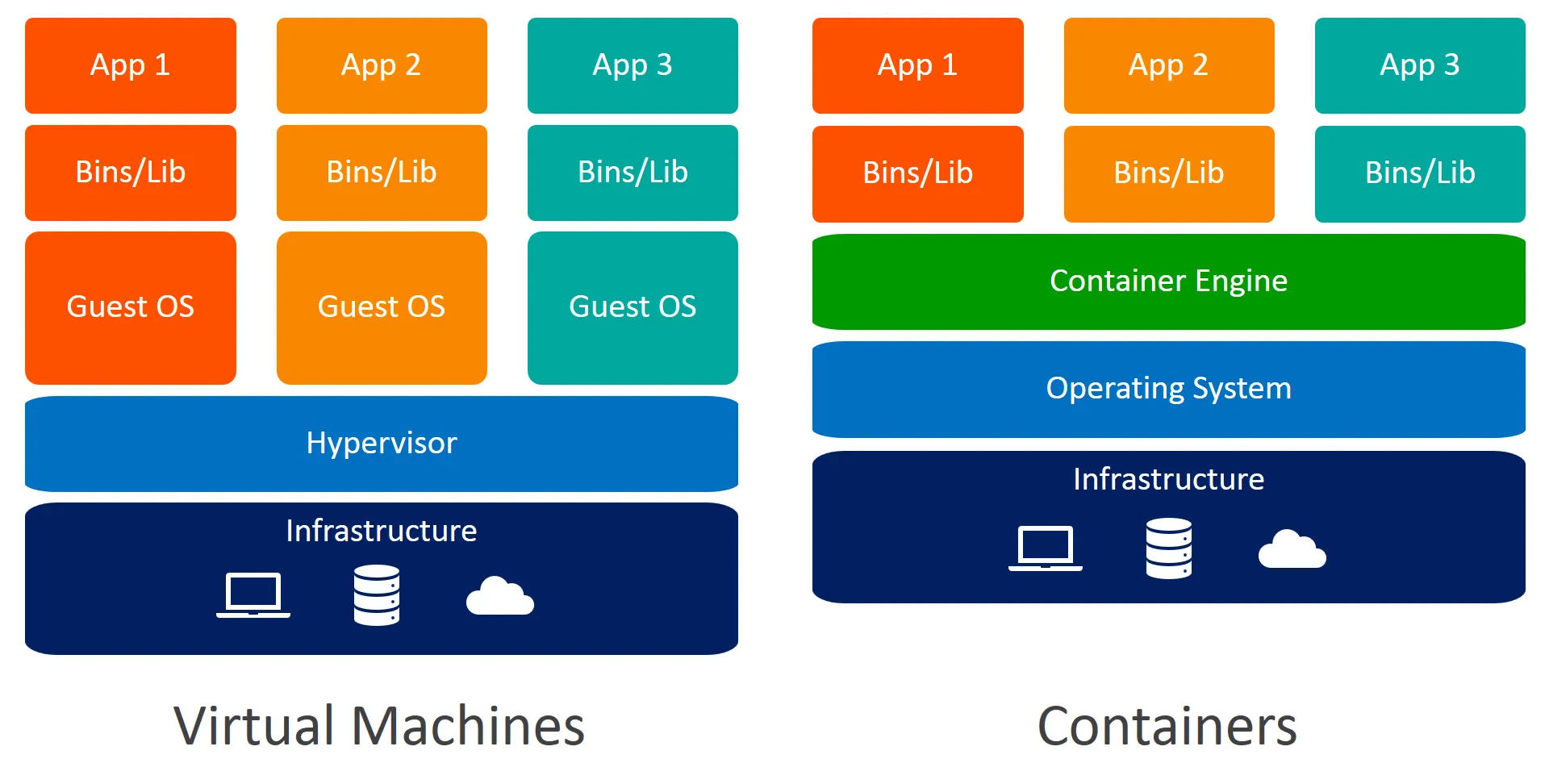
| Component | Virtual Machine | Container |
|---|---|---|
| Virtualization Type | Hardware-level virtualization via hypervisor | OS-level virtualization via namespaces |
| Guest OS | Full OS per VM | No guest OS; shares host OS kernel |
| Startup Time | Minutes (boots entire OS) | Seconds (starts an isolated process) |
| Resource Usage | Heavyweight (requires more RAM, CPU) | Lightweight (minimal overhead) |
| Isolation | Strong (hardware boundary) | Medium (process isolation) |
| Portability | Lower (OS-dependent) | High (OS-agnostic within same kernel) |
| File Size | GBs (entire OS image) | MBs (only app and dependencies) |
DOCKER ARCHITECTURE
Docker uses a client-server architecture to run and manage containers. It’s built around lightweight OS-level virtualization using Linux features like namespaces and cgroups.Docker uses a client-server architecture to run and manage containers. It’s built around lightweight OS-level virtualization using Linux features like namespaces and cgroups.
Component
- Docker CLI The command-line tool (docker) that users interact with. Sends requests to Docker Daemon via REST API.
- Docker Daemon (dockerd) The background service that manages Docker objects: containers, images, volumes, etc.
- Docker REST API Interface through which CLI and tools communicate with the daemon.
- Container Runtime Docker uses runc by default (complies with OCI). It’s responsible for running containers.
- Docker Engine Umbrella term for the Docker Daemon + CLI + APIs that run and manage containers.
- Linux Kernel Features Uses namespaces (for isolation) and cgroups (for resource control).
containerdIndustry-standard container runtime that Docker uses internallyrunc Low-levelOCI runtime to spawn containersoverlay2Default storage driver for Docker (Union FS for layers)
Linux Kernel Features Behind Docker
- Namespaces Isolate container processes (PID, NET, UTS, MNT, IPC, USER)
- cgroups Limit CPU, memory, I/O usage for containers
- UnionFS Layered filesystem used by Docker images (e.g., OverlayFS)
- Capabilities Drop unnecessary root privileges for better security
DOCKER IMAGE, CONTAINER, DOCKERFILE
Docker Image - A Docker image is a read-only template that contains the application code, runtime, libraries, environment variables, and configurations required to run an application. docker build -t myflaskapp .
Docker Container - A Docker container is a running instance of a Docker image. It’s a lightweight, standalone, and executable software package that runs your application in an isolated environment. docker run -d -p 5000:5000 myflaskapp
Dockerfile - A Dockerfile is a script with a set of instructions on how to build a Docker image. It defines the base image, copies files, installs dependencies, and sets environment configurations.
# Use base imageFROM python:3.11
# Set working directoryWORKDIR /app
# Copy filesCOPY requirements.txt .RUN pip install -r requirements.txtCOPY . .
# Run the appCMD ["python", "app.py"]DOCKER LAYERS
A Docker image is made up of a series of layers, where each layer represents an instruction in the Dockerfile (like FROM, COPY, RUN, etc.). Each layer
- Is immutable (unchangeable).
- Is cached and reused in future builds if unchanged.
- Stacks on top of previous layers to create the final image.
Benefits: Caching: Docker caches each layer. If the code or files in a layer don’t change, Docker reuses the cached layer. Efficiency: Layers are shared across images — if multiple images use the same base image (like python:3.11), Docker stores it only once. Smaller Updates: Only the changed layers are rebuilt and pushed to registries.
Commands like COPY, ADD, or RUN invalidate cache if inputs or order change.
MULTI-STAGE BUILDS
-
Multi-stage build uses multiple FROM statements in one Dockerfile.
-
First stage builds the code or binaries.
-
Final stage copies only necessary files/artifacts.
-
Avoid shipping build-time dependencies in the production image.
-
This reduces image size, removes sensitive files, and keeps only what’s needed in production.
-
You compile in one stage (using full toolchain).
-
Then copy only the output (binaries/files) into a clean, minimal final image.
# -------- Stage 1: Build Stage --------FROM golang:1.21 AS builderWORKDIR /appCOPY . .RUN go build -o main .
# -------- Stage 2: Production Image --------FROM alpine:latestWORKDIR /appCOPY --from=builder /app/main .CMD ["./main"]DOCKER NETWORK
Docker networking provides communication between containers, between containers and the host machine, and with the outside world. Each container gets a unique IP address, Its own network namespace and Controlled port mappings
There are 5 types of network mode in docker
- Bridge
- Bridge (default for standalone containers) Creates an internal network on the host.
- Containers on the same bridge network can communicate.
- The host and external systems cannot reach containers directly unless ports are expose
- create:
docker network create --driver bridge my-bridge, USE:docker run --network my-bridge nginx
- Host
- The container shares the host machine’s network stack.
- No network isolation between host and container.
- No need for -p to publish ports — container uses host ports directly
docker run --network host nginx
- Overlay
- Used with Docker Swarm or multi-host clusters.
- Creates a virtual network spanning multiple Docker hosts.
- Uses VXLAN tunneling for cross-host container communication.
docker network create --driver overlay my-overlay
- None
- The container has no network interface.
- Used for containers that don’t require networking or for full custom network stacks.
docker run --network none alpine
- Macvlan
- Assigns containers a real MAC address and IP from the LAN.
- Bypasses NAT — containers appear like physical devices on the network.
- Requires configuring a physical network interface on the host.
docker network create -d macvlan --subnet=192.168.1.0/24 --gateway=192.168.1.1 -o parent=eth0 my-macvlan
DOCKER VOLUMES
Containers are ephemeral by design — once deleted, their filesystem is lost. Docker volume is a persistent storage mechanism managed by Docker, used to store data outside of the container’s writable layer, so that data persists across container restarts or removals. it provides Data durability, Sharing data between containers, Storing configuration files, logs, or user data.
There are 3 types of docker volumes
- Named Volumes
- Created and stored under Docker’s storage directory (/var/lib/docker/volumes)
- Docker handles the location and management.
- More portable and suitable for production use.
- Create:
docker volume create my-volume, USE:docker run -v my-volume:/data ubuntu
- Anonymous Volumes
- Created automatically by Docker when you mount a volume without a name.
- Hard to reference or reuse later.
docker run -v /data ubuntu
- Bind Mounts
- Mounts a specific host path into the container.
- Not managed by Docker — offers more control, but less portability.
docker run -v /home/user/app:/app ubuntu
DOCKERFILE
A Dockerfile is a text-based script that contains a set of instructions on how to build a Docker image. It defines everything needed for your app:
- Base OS
- Dependencies
- App files
- Build steps
- Environment variables
- Default commands Docker reads this file when you run docker build, and each instruction creates a layer in the image.
Dockerfile Attributes
| Instruction | Description / Purpose | Example Usage |
|---|---|---|
FROM | Sets the base image for the build. Required as the first instruction. | FROM ubuntu:22.04 |
RUN | Executes shell commands inside the image during build. Creates a new layer. | RUN apt-get update && apt-get install -y nginx |
CMD | Sets the default command to run when the container starts. Can be overridden by CLI. | CMD ["npm", "start"] |
LABEL | Adds metadata to the image. Useful for versioning, authorship, etc. | LABEL maintainer="you@example.com" |
EXPOSE | Documents the port the container will listen on. (Does not publish the port.) | EXPOSE 8080 |
ENV | Sets environment variables in the container. | ENV NODE_ENV=production |
ADD | Copies files and directories to the container, with support for remote URLs and archive auto-extraction. | ADD myapp.tar.gz /app/ |
COPY | Copies files/directories to the container (without extraction). More predictable than ADD. | COPY . /app/ |
ENTRYPOINT | Configures a fixed command that always runs. Useful for defining a wrapper script. | ENTRYPOINT ["python", "app.py"] |
VOLUME | Creates a mount point for a volume inside the container. | VOLUME ["/data"] |
USER | Sets the username or UID to run subsequent commands (good for security). | USER appuser |
WORKDIR | Sets the working directory for subsequent instructions. | WORKDIR /app |
ARG | Declares a build-time variable. Used with --build-arg. | ARG VERSION=1.0 |
ONBUILD | Adds a trigger instruction to be executed when the image is used as a base for another build. | ONBUILD COPY . /app |
STOPSIGNAL | Defines the system signal to stop the container. | STOPSIGNAL SIGTERM |
HEALTHCHECK | Defines how Docker checks the health of a running container. | `HEALTHCHECK CMD curl -f http://localhost/ |
SHELL | Changes the default shell used in RUN (default is /bin/sh -c). | SHELL ["powershell", "-command"] |
.dockerignore | (Not an instruction) File used to exclude files from being copied to the image (like .gitignore). | .dockerignore → node_modules, .git/ |
Dockerfile sample
# ---- Stage 1: Builder ----FROM node:18-alpine AS builder
# ARG used at build timeARG NODE_ENV=productionENV NODE_ENV=${NODE_ENV}
# Label for metadataLABEL maintainer="you@example.com"LABEL stage="builder"
# Set working directoryWORKDIR /app
# Copy package files and install depsCOPY package*.json ./RUN npm install --only=production
# Copy the full app sourceCOPY . .
# Optional: run build step if app has oneRUN npm run build
# ---- Stage 2: Final image ----FROM node:18-alpine
# Set environment variableENV NODE_ENV=production
# Set working directoryWORKDIR /app
# Use a specific user for securityRUN addgroup -S appgroup && adduser -S appuser -G appgroupUSER appuser
# Copy built app from builder stageCOPY --from=builder /app ./
# Expose app portEXPOSE 3000
# Healthcheck for container readinessHEALTHCHECK --interval=30s --timeout=5s --start-period=10s --retries=3 \ CMD wget --no-verbose --tries=1 --spider http://localhost:3000 || exit 1
# Create a volume (optional)VOLUME ["/app/logs"]
# Default commandCMD ["node", "server.js"]
# Entrypoint for customization (optional)# ENTRYPOINT ["node"]DOCKER COMPOSE
Docker Compose is a tool for defining and running multi-container Docker applications using a single YAML file (docker-compose.yml). Instead of running each container manually, you can define:
- Services (containers)
- Networks
- Volumes
- Build instructions
- Environment variables
Tips & Best Practices
- Use named volumes instead of bind mounts in production.
- Use depends_on + healthcheck for smarter service boot sequencing.
- Add .env file to keep secrets/configuration out of code.
- Use docker-compose.override.yml for environment-specific changes.
- Use build.context and build.dockerfile for better control.
composefile with all arguments
services:  web:    container_name: my-web-container  # Custom container name    build:      context: ./web  # Build directory      dockerfile: Dockerfile  # Custom Dockerfile name      args:        - NODE_ENV=production  # Build-time argument    image: my-web-app:latest    ports:      - "8080:80"  # Host:Container    environment:      - APP_ENV=production      - DEBUG=false    env_file:      - ./web/.env  # External env file    volumes:      - web-data:/var/www/html  # Named volume      - ./web/static:/static  # Bind mount    depends_on:      - db    networks:      - frontend    restart: unless-stopped    command: ["npm", "start"]    entrypoint: ["docker-entrypoint.sh"]    working_dir: /var/www/html    stdin_open: true    tty: true    healthcheck:      test: ["CMD", "curl", "-f", "http://localhost"]      interval: 30s      timeout: 10s      retries: 5      start_period: 10s    labels:      com.example.description: "Web frontend"
  db:    image: postgres:15    container_name: db-container    ports:      - "5432:5432"    environment:      POSTGRES_DB: mydb      POSTGRES_USER: admin      POSTGRES_PASSWORD: secret    volumes:      - db-data:/var/lib/postgresql/data      - ex-vol:/test    networks:      - backend      - proxy    restart: on-failure
  redis:    image: redis:7    container_name: redis-container    ports:      - "6379:6379"    networks:      - backend
volumes:  db-data:  web-data:  ex-vol:    external: true
networks:  frontend:    driver: bridge  backend:    driver: bridge  proxy:    external: true
DOCKERIGNORE
.dockerignoreis a text file that tells Docker which files and folders to exclude from the build context when you rundocker build.
node_modules.gitDockerfiledocker-compose.yml.env*.log*.tmp*.bakbuild/coverage/__pycache__/*.pyc